Initace
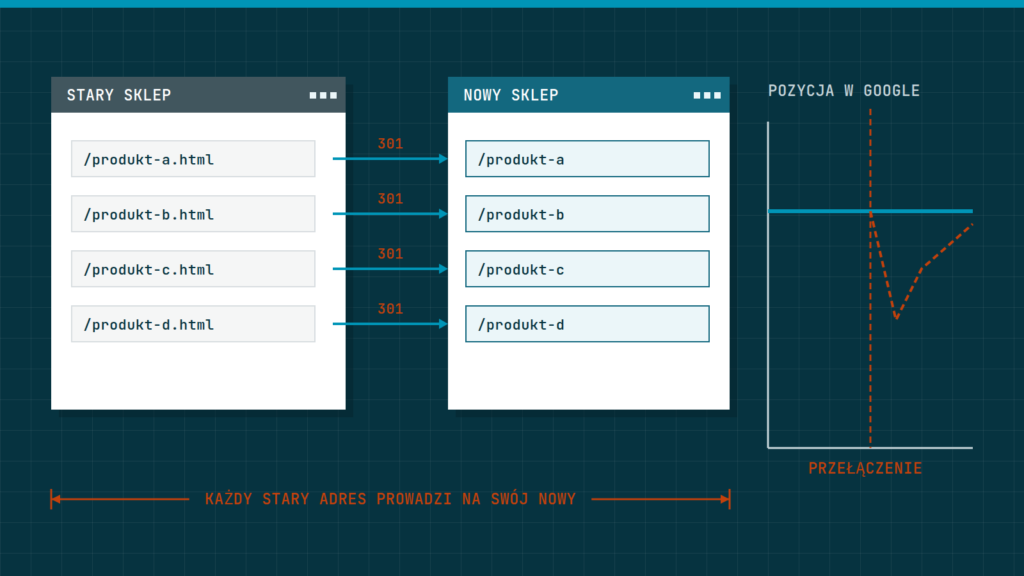
You will not lose your Google rankings when you change platform if you keep your page addresses or redirect every old address to its new equivalent, carry the content over, and check the results after launch. Short-term swings happen even with a good migration, but serious drops usually come from missed redirects and lost content. Below we describe how to prepare.
Why changing platform risks a drop
Google remembers the addresses of your pages and judges them by their content, by the links that lead to them from other sites, and by how visitors behave. When you change platform, the addresses often change: a different pattern for category addresses, a different ending, a different structure. If an old address stops working and does not point to the new one, Google will not carry its value over, and customers land on an error.
The second risk is content. A new store may have shorter descriptions, fewer categories or different headings, because someone assumed it would “be better anyway”. Yet the pages that attract traffic today should keep what Google values them for. The third risk is speed and technical errors after launch, such as a block for search engines left over from the testing period. For general knowledge about store SEO, see the guide SEO for e-commerce: what really works in 2026.
Before you start: take stock of what you have
Without an inventory, nothing can be moved or compared. Make it early, while the old store is still running.
- Export a list of all your store’s addresses: home pages, categories, products, articles, information pages.
- Mark those that bring traffic and sales. You will find the data in the tools you already use to check visibility in Google.
- Save the titles and descriptions of the pages that matter to you, as well as the headings and their text.
- Take screenshots of the key pages so you can compare appearance and layout after launch.
- Record the figures from recent months: visits from search, orders, conversion. Without a baseline you cannot judge the effects.
- Check which pages have links from other sites, because those are the most valuable and must not be lost.
Addresses and redirects
This is the most important part of a migration. There are two strategies: keep the addresses unchanged, or change them and redirect. The first is safer, the second is more often unavoidable, because the new platform has a different structure.
| Situation | What to do |
|---|---|
| The address can stay the same | set up the new store to generate the same addresses |
| The address has to change | redirect every old address to its new equivalent with a permanent redirect |
| The page no longer exists | redirect to the closest page by topic, not to the home page |
| Discontinued product | keep the page with a notice and suggestions for similar products, or redirect to the category |
A permanent redirect is an instruction to the server: “this address has moved here for good”. Thanks to it, Google and customers land in the new place, and the value of the old address is carried over. Make a spreadsheet with two columns, the old and the new address, and test every row after launch. Do not redirect everything to the home page, because to Google that is like deleting the page.
Content, headings and product data
Carrying over the addresses alone is not enough. Keep what makes the pages valuable.
- Carry over descriptions, titles and search descriptions, and if you shorten them, do it on purpose.
- Keep the headings and structure of important pages, including category descriptions.
- Carry over the alternative text of images and the file names, if they made sense.
- Check that product data such as price, availability and ratings has moved correctly.
- Carry over articles and guides, because they often attract traffic from outside the store.
- Make sure the new store is not slower than the old one. A slow page hurts visibility.
If you are moving a store from an old version of PrestaShop or WooCommerce, the overview of options in the guide PrestaShop or WooCommerce: which to choose will help. We describe our scope of migration work on the page Store migration: an update to a new version starts from €355 net, and a move to a new platform with a refresh quote after a call.
Launch: what to check on switch-over day
Switch-over day is the moment of greatest risk, so prepare a list and tick it off in order.
- Turn off the block for search engines, which is usually switched on while the store is being built. Left on after launch, it makes the store disappear from Google.
- Check the file with instructions for search robots, to see that it does not forbid access to important pages.
- Check the redirects: pick a few dozen old addresses and open them in a browser.
- Submit the new sitemap to Google.
- Check that payments, forms and confirmation e-mails work by placing a test order.
- Click through the most important pages on a phone.
- Make sure all addresses in the new store use an encrypted connection and one version of the domain.
Checks after launch
For the first few weeks, check the state of the store often. Swings in results are normal, because Google needs time to process the changes. What should worry you is a drop that keeps deepening.
- Daily for the first week: “not found” errors in reports, orders, the error log.
- Weekly for the first month: the number of pages in the Google index, visits from search, positions of the most important phrases.
- After a month: a comparison with the baseline and a review of pages that lost traffic.
If you see a drop on specific pages, check whether they have a redirect, whether the content was shortened, and whether the page loads more slowly than before. Fix one thing at a time and watch the effect.
The most common migration mistakes
Experience shows the same mistakes repeat whatever the platform. You know them now, so you can avoid them.
- Leaving the block for search engines switched on after launch.
- Redirecting all old addresses to the home page.
- Skipping pages with less traffic that together bring a large share of visits.
- Shortening category descriptions because “there is no room in the new template”.
- Changing addresses and content at the same time, with no baseline to compare against.
- Launching just before the busiest sales period.
- Having nobody responsible for the checks after launch.
If a safe migration matters to you, agree with your contractor in writing who makes the inventory of addresses, who handles the redirects and who checks them after launch. Unclear responsibility is the most common cause of omissions.
Choosing the date
Do not move the store just before the sales peak. The best time is a quieter period, so you have room for fixes. Keep a reserve for unexpected difficulties and agree with your contractor who is available in the first days after launch.
In short: inventory your addresses and content, keep the addresses or redirect every old one to its new equivalent, carry the content over, and watch the reports for several weeks after launch.
Planning to change your store’s platform? We will handle the migration, from the address inventory to the checks after launch, or book a call.