Initace
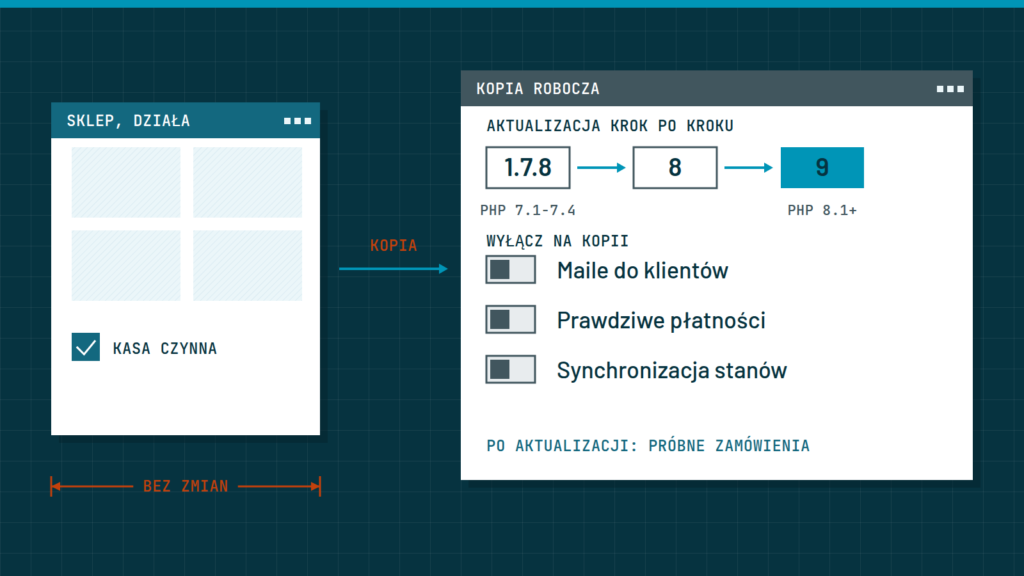
A store update is safe when someone first carries it out on a staging copy, a separate instance of the store at a different address, places test orders there, and only then repeats the same changes on the store where customers buy. WooCommerce says plainly that you should not test updates on a live store. So the question for the owner is not “whether” but “who” does it and what it costs: money, time and the attention you would rather give to selling.
Source of the third figure: Patchstack, “State of WordPress Security in 2026” (read on 10 November 2026); it is a weighted median for the most heavily exploited vulnerabilities. The first two are a calculation on our assumptions: 240 orders a month, a 220 PLN basket, a 28% margin, and an estimate of our working time, worked out below.
Why does an update break a store when you changed nothing?
The trouble rarely comes from the platform itself. It usually comes from what surrounds it, and you find out something has stopped fitting only after the update:
- Add-ons written for an older version. Payments, delivery and wholesaler integrations are separate programs. WooCommerce tells you to check, for each of them, which platform version it was tested with, and to look for an update if that version is older than the one you are moving to.
- The theme’s own templates. A theme can carry its own copies of store screens, such as the checkout, and they stay old when the platform changes its own.
- The PHP version on the server. Each platform version runs only on certain PHP versions, so changing PHP is an update in its own right, with its own risk.
- A fault nobody sees. The checkout can work without any message and still miscalculate delivery or not show BLIK. That comes out only in a test order, and without one only after a week in the sales report.
On the other hand, not updating is not an option. According to Patchstack, 11,334 new vulnerabilities were found in the WordPress ecosystem in 2025, 42% more than a year earlier, and 91% of them concerned plugins. About half of the high-impact vulnerabilities get exploited within 24 hours, and 46% had no fix from the author at the time of disclosure. WooCommerce recommends updating once a month, but security fixes sooner, because speed then matters more than the usual rhythm.
What does a mistake after an update cost?
Take a store that gets 240 orders a month with a 220 PLN basket (assumptions, use your own). That is 52,800 PLN of revenue a month, 1,760 PLN a day, and at a 28% margin about 493 PLN of margin a day. Add the ads that keep sending traffic to a store with a broken checkout; we assumed 150 PLN a day (an assumption).
| How long the checkout does not work | Revenue that will not arrive | Lost margin | Ads paid for with no sales |
|---|---|---|---|
| 1 day | 1,760 PLN | 493 PLN | 150 PLN |
| 3 days | 5,280 PLN | 1,478 PLN | 450 PLN |
| 7 days | 12,320 PLN | 3,450 PLN | 1,050 PLN |
This is an upper bound, but the average hides peaks
Some customers will come back, so the real loss is smaller than in the table. On the other hand, a day during a promotion or before the holidays sells several times more than an average day. We do not count the cost of the repair, your own working time or customers who do not return after a failed purchase, because we have no reliable figure for such customers.
How long does watching updates yourself take?
A safe update is not one click but several stages. The times below are our estimate for a small store, not data from sources:
| Stage of the monthly update | Estimated time |
|---|---|
| Checking what needs updating and whether the add-ons fit the new version | 30 minutes |
| A backup and setting up the staging copy with emails, payments and integrations cut off | 1 hour |
| Updating the copy and test orders (payments, parcel locker, discount, account, return, phone) | 1.5 hours |
| Repeating it on the store and shortened checks | 30 minutes |
| Watching orders over the following days | 30 minutes |
| Total | approx. 4 hours a month |
That is 48 hours a year. If an hour of the owner’s time is worth 100 PLN (an assumption), it comes to 400 PLN a month. That calculation does not settle the matter, because something else matters more: updates are done without haste, and in the season more urgent matters usually push them out. Then the store stays on the old version, with flaws that according to Patchstack can be exploited within hours of disclosure.
Not sure what state your store is in before you update anything? A shop audit shows, among other things, which plugins, modules and theme are out of date or abandoned by their authors, how many accounts have full permissions and whether a backup exists outside the store’s server (with read-only access). You get a list of risks with the price of each fix, so you know what may break at the next update, and a review call in the price. The shop audit costs €450 net and the result comes in 10 working days. The audit price is not deducted from a care subscription. See what we check and what you get.
What does a safe update look like?
This is how we update stores in our care plans, and it is also a list of questions worth asking any contractor:
- A backup and a staging copy. A backup is a record of the store from one moment, which you go back to after a failure. A staging copy is a working second store at a different address, where you can update and break things without affecting customers. It is built from a backup.
- Cutting the copy off from the world. The copy has the same customer addresses, payment keys and wholesaler connections as the store, so without cutting them off a test order will send a real e-mail or take real money.
- Updating the whole set at once. The platform, add-ons, theme and payments are updated in order, and later exactly the same set goes onto the store.
- Test orders. With every payment and delivery method, with a discount code, with and without an account, a return or cancellation, and the confirmation e-mail opened on a phone.
- A rollback plan. Settled before the update: where the backup is, who restores it, how long it takes and what symptom triggers going back. Restoring the pre-update database will delete orders placed in the meantime, so they must be saved first.
- Going live in a quiet window. We put it on the store in a window chosen with you, with a rollback plan ready. For us it is a rule: no updates before the holidays or on a Friday afternoon, and before the season we freeze changes on the store. The documentation sets no dates, so this is our rule of caution; a security fix is the exception.
PrestaShop also more often needs a developer’s manual work than WooCommerce, which is why care for a PrestaShop shop costs more with us. A jump of several versions at once, for example from PrestaShop 1.7 to 9, is a separate project, not an ordinary update. We write about it in the store migration and update service.
The most expensive mistake: a staging copy with emails and payments switched on
Customers get confirmations of orders they never placed, and the wholesaler and the courier receive test orders as real ones. The second common mistake is a different set of updates on the store than the one checked on the copy, because a new plugin version came out in the meantime.
What do we do for you in store care?
In store care we do all of this work for you. You do not watch versions, test the checkout or wait for a release window: you get a message and a monthly report, and we do what this article describes. A month looks like this:
- We check what needs updating and whether the add-ons fit the new version.
- We build a staging copy from a backup and cut it off from e-mails, payments and integrations, so a test order sends no real message and takes no real money.
- We update the copy and place test orders along the list of your store’s purchase paths: payments, parcel locker, discount, account, return, phone.
- We go live in a chosen window, with a rollback plan ready: we know where the copy is, who restores it and what symptom makes us go back.
- We freeze changes before the season. Before the peak of sales we touch nothing on the store (in 2026 the freeze began on 27 November), and security fixes get a separate decision.
- We report once a month on what we did. When sales stop, we respond within the time described in the plan.
What does it mean for you? The four hours a month we counted above are our work, not yours. They go back to selling, and we take the cost of a mistake on ourselves by testing on a copy.
This is the calculation from this article on our assumptions: the time of watching is our estimate, the owner’s hour is worth 100 PLN, and the store has 240 orders a month at a 220 PLN basket and a 28% margin.
| WooCommerce shop | PrestaShop shop | |
|---|---|---|
| Price (net) | €145 net/month, yearly €1,450 net/year | €190 net/month, yearly €1,900 net/year |
| In the plan | Updates tested on a copy, a daily backup (kept for 30 days), managed hosting, a reply within 4 h, weekends included when sales are blocked, 5 h of minor changes, a monthly report. | As Care — WooCommerce; PrestaShop more often needs a developer's manual work on updates. |
Compare that with the calculation above. Care for a WooCommerce shop costs €145 net/month, which is less than the margin lost in three days of a broken checkout (1,478 PLN), and we priced watching it yourself at 400 PLN a month, without the risk that calculation does not count. We do not claim that care always pays: if you sell little, update rarely and can check the checkout yourself, you may stay with watching it yourself.
What if you do not buy care
Care is not compulsory. The store stays entirely yours, and you do the updates, backups and minor fixes yourself or order them from us one at a time. If you give up care, we delete and block nothing.
Questions and answers
I have a small store. Isn’t a staging copy overkill?
For a small fix to one plugin, a fresh backup and a test order right after the update are enough. For a new major version of the platform, a PHP change or a theme with its own templates, a staging copy protects against the checkout going down.
What about updating a store whose care you do not handle?
We price a single update to a new version, for example PrestaShop 1.7 to 9, from €355 net without changing the look of the store. We check the scope after a conversation.
In short: a day of a broken checkout costs 493 PLN of margin in the example, and watching updates yourself takes about 4 hours a month. A safe update goes through a staging copy, test orders and a rollback plan. In store care we do it for you: a staging copy, test orders, going live in a chosen window with a rollback plan, a change freeze before the season and a monthly report.
Would you rather sell than watch updates? In store care you get an updated store after test orders and a monthly report, and the hours that now go on watching versions go back to selling. Care for a WooCommerce shop costs €145 net/month, and for a PrestaShop shop €190 net/month. See the store care plans or book a 15-minute call, and we will tell you which plan fits your store and what a test on a copy would look like for you.