Initace
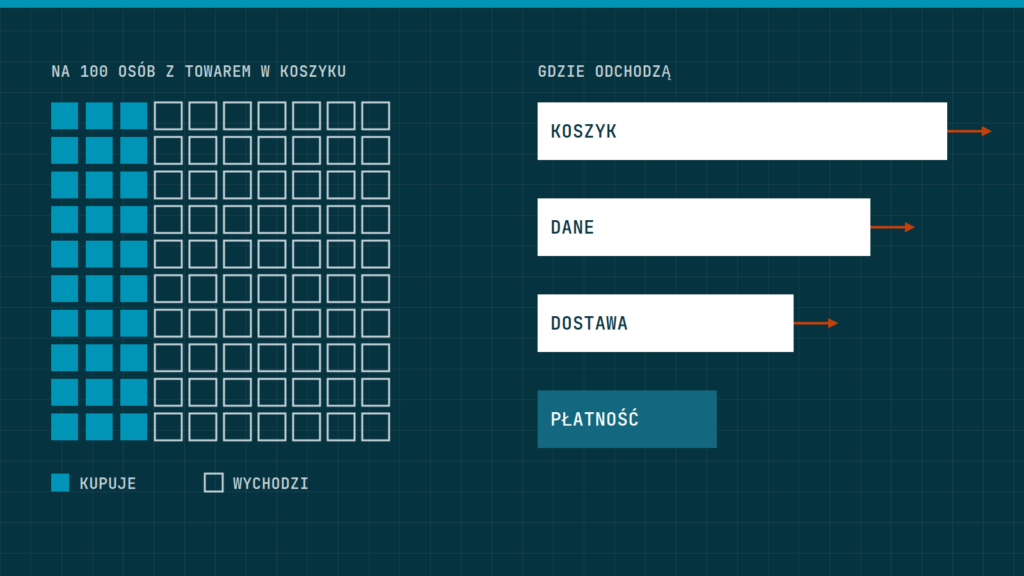
You win back an abandoned cart by first removing the obstacles in checkout and then sending the customer one polite reminder. The reverse order does not work: reminding someone about a purchase that cannot be finished comfortably only irritates. Below we explain the reasons for abandonment, the fixes and how to write a good message.
What an abandoned cart is and why it happens
An abandoned cart is when a customer has added products to the cart but has not paid. Some of these people never meant to buy: they were checking a price, comparing offers or using the cart as a wish list. That is normal and should not be treated as a failure. The ones who matter to you are those who wanted to buy but something stopped them.
The most common causes are:
- Unexpected costs. Delivery, a cash-on-delivery fee or tax appear only at the end. We describe how to show them earlier in the article Delivery costs: how to show them without scaring shoppers away in the cart.
- Forced account creation. The customer wanted to buy one thing, and the store makes them invent a password.
- A long or unclear form. Too many fields, vague errors, no address suggestions.
- Missing favourite payment method. The customer looks for BLIK (a Polish mobile payment system) or a bank transfer and does not find it.
- Lack of trust. The company details, return policy or delivery date are not visible.
- A fault or a slow page. A cart that takes long to load discourages at the worst possible moment.
- Distraction. The phone rang, a child called, the battery died.
First fix the purchase path
A reminder message will win back only those who were stopped by distraction. The others have to be won back by removing the obstacles. A good base is the guide A checkout that does not put people off: how to design the purchase path. Here we collect what brings results fastest.
- Go through the whole purchase from the product page to payment, ideally on a phone, as a customer without an account. Note where you stumble.
- Enable buying without creating an account. An account can be offered after the purchase, with one button.
- Keep only the fields you really need for shipping and the invoice. Hide the “company” and “tax number” fields until the customer asks for them.
- Show the delivery cost and date before the customer gives their details.
- Display clear error messages next to the specific field, in plain words.
- Show the available payment methods early and use their general names, which the customer understands.
- Add the company details, return policy and contact in a visible place in the cart.
If you are not sure which step causes trouble, ask two people from outside the company to buy something in your store, while you only watch and do not prompt. It costs an hour and shows more than pondering.
Remember the cart
A customer often returns to the store the next day, on another device, or after talking to someone at home. If the cart has vanished, they start over and often give up. Check that the store keeps the cart for several days for logged-in customers, and for logged-out ones in the same browser. Test it: add a product, close the browser, open it the next day.
Similarly, check that products in the cart do not disappear after a change of price or availability with no message. If an item has run out, say so plainly and suggest a similar one. We write about accurate stock levels in multichannel stores in the guide Stock synchronisation: how to avoid overselling.
A cart reminder message
Send the reminder only to those who gave an e-mail address, usually at the start of checkout, and only if they consented in line with the rules you adopted in the store. Check the consent rules with a lawyer.
A good message is short and helpful, not pushy. It should contain:
- in the subject, the product name or a simple question, for example “Your cart is waiting”,
- the image and name of the product and a “Back to your cart” button that leads to exactly that cart,
- answers to the most common doubts: delivery date, return policy, payment methods,
- contact details of a person who can be written to with a question.
There is no single golden rule for the sending time or the number of messages. A sensible start is one message after a few hours and possibly a second the next day. Then measure whether it works and only then change it. Add a discount with care: if customers learn that an abandoned cart earns a reduction, they will start abandoning on purpose.
How to check that it works
Measure two things: how many started orders end in payment, and how many carts come back after the message. WooCommerce and PrestaShop have basic order reports, and much of the data on visitor behaviour can be collected in Google’s analytics tool. Compare the same period before and after the changes, and change one thing at a time, or you will not learn what worked.
Watch quality too: do the recovered customers return goods more often than the others? Do you get complaints about messages that are too frequent? The number of recovered orders is not the only indicator; trust in the store matters as well.
What not to do
It is easy to overdo cart recovery, and the result can be the opposite of what you intended.
- Do not send several messages a day. One or two are enough. More only irritate and raise the risk that your address lands in spam.
- Do not fake urgency that is not there. Notices like “only a few left” are acceptable only when true. A deceived customer does not come back.
- Do not force an e-mail address as the first step. Asking for details before showing the product and price puts people off.
- Do not link to the home page. The button in the message should lead to the cart with the same products.
- Do not ignore replies. If a customer answers the message with a question, reply the same day, because that is a person ready to buy.
Remember that the aim is to help finish the purchase, not to pressure. A store that seems honest and helpful wins back more customers than one that only hurries them.
A two-week plan
- Days 1–2: go through a purchase on a phone and list the obstacles.
- Days 3–7: remove the three biggest obstacles, for example forced account creation, unnecessary fields and a hidden delivery cost.
- Days 8–9: check that the cart is remembered.
- Days 10–12: write the reminder message and set up its sending.
- Days 13–14: set up measurement and record the baseline, so you can compare results in a month.
In short: first remove the obstacles in checkout, then remember the cart, and only at the end send one polite reminder. Measure the results and change one thing at a time.
Want us to review your store’s purchase path? We can do it as part of the store project or book a call.