Initace
You can check this in an hour: open the cart and checkout pages in your browser’s developer tools, list every script that loads, and compare that list with what you knowingly added yourself, then look at the theme’s header file and at the fields where code can be pasted. A foreign script that nobody can explain is a reason to act at once. This kind of attack does not break the store, orders come in as usual, which is why the owner is usually the last to find out.
How the attack works
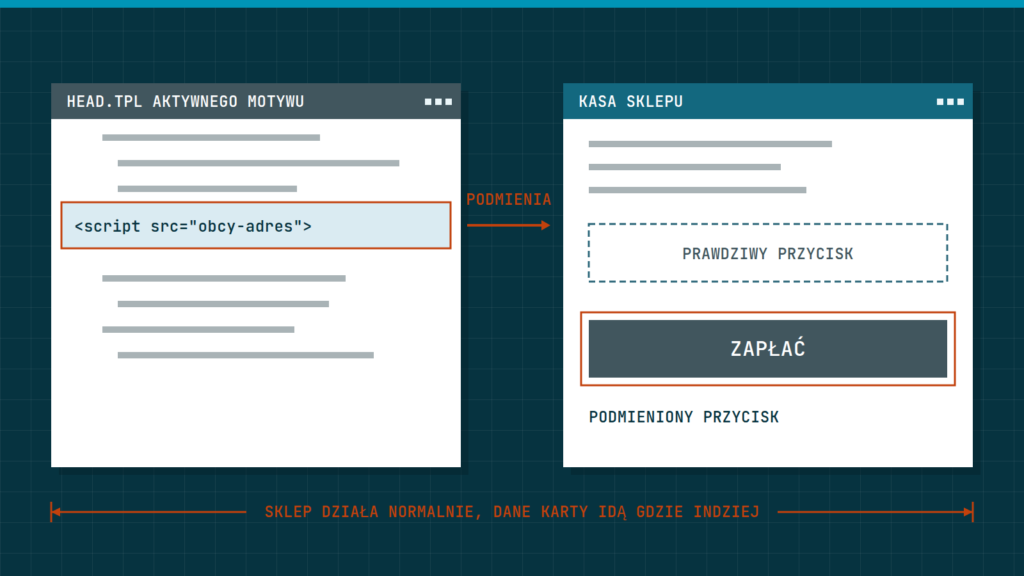
Someone adds a few lines of JavaScript to the store’s pages. The code runs in the customer’s browser, reads what the customer types into the payment form and sends it to the attacker’s server. The name skimming comes from the overlays fitted to cash machines, which do the same with a card. Sometimes the script replaces the payment button and takes the customer to a fake card form instead.
That is exactly the case PrestaShop described in its notice of 11 February 2026, Security Alert: Recommended Check of Your Stores. The malicious code replaced the real payment buttons on the order page with fake ones, and it was loaded by a single <script> tag added to the _partials/head.tpl file of the active theme. PrestaShop points out that since the file was changed, the attacker had write access to the store’s files.
Where foreign code in a store comes from
The attacker first has to reach a place from which the page can be changed. In PrestaShop and WooCommerce stores there are four usual routes.
- A vulnerability in an outdated module, plugin or the platform itself. In May 2026 Sansec described attacks on the Funnel Builder plugin for WooCommerce: versions older than 3.15.0.3 let anyone, without logging in, put any script into the plugin’s “External Scripts” setting, and that script then loaded on every checkout page.
- Theme files. The header template loads on every page, so one line in it is enough. That was the case in the PrestaShop notice.
- Tag managers and custom code fields. Many stores have places in the admin panel where any HTML can be pasted: Google Tag Manager, theme settings, “custom header code” modules. In the case Sansec described, the malicious script posed as Tag Manager code and sat next to the real marketing tags, so at first glance it looked no different from them.
- A taken-over account. An old account of an employee, agency or contractor with editing rights, an FTP password from years ago, a store access key issued to an integration you no longer use.
The code can sit in a file or in the database, in a plugin or module setting, so comparing files alone will not find everything.
Does an external payment gateway protect you
Partly. If the customer enters card details on the payment provider’s page (after a redirect) or in the provider’s form embedded in a frame, the card number does not pass through your server, and a script on the store’s page cannot simply read the fields inside the provider’s frame. This genuinely lowers the risk, which is why it is a good choice for a small store.
It does not settle the matter, though. A script on your page can still change what the customer sees before going to the provider: swap the button, the redirect address or the whole frame for a fake form. That is how the attack in the PrestaShop notice worked. The PCI SSC (the body that issues the PCI DSS card security standard) writes in its guidance of March 2025 that embedding the provider’s form in a frame does not take the page containing that frame out of scope of the script requirements. The gateway protects the card details in its own form, but making sure the customer reaches that form is your responsibility.
What you can check yourself in an hour
You do not need a developer for this list, just Chrome or Firefox, access to the store’s admin panel and to the files on the server (FTP or your host’s file manager).
- Add a product to the cart and go to the checkout. Press F12, open the Network tab, choose the JS filter and reload the page. Write down the domains the scripts load from. The panel is described in the Chrome DevTools documentation.
- Next to each domain, note who added it and why: payment provider, analytics, chat, courier. A domain nobody can account for needs explaining today. Watch out for names deceptively similar to well-known services.
- In the Elements tab, or through “View page source”, look for scripts written directly into the page code. Fragments with
atob(,eval(,Function(and long strings of random characters are suspicious. PrestaShop says that in the attack it described theatob()function always appeared, while the rest of the code differed from store to store. - In Google Tag Manager, check the list of tags of the Custom HTML type and the container’s version history: who added each one and when. Do the same with the “custom code” fields in the settings of the theme, modules and plugins.
- Go through the list of accounts with admin panel access and delete accounts of former employees, contractors and test accounts. Go through the list of integration access keys in the same way (where to find them in the panel is described below).
- Make a list of modules or plugins that have an update available. Those that handle the cart and checkout come first.
Keep the list of scripts. In a month you can compare it with a new one and see what has been added.
PrestaShop: what to look at
- Open the file
themes/<aktywny-motyw>/templates/_partials/head.tpl(the folder of your active theme) over FTP and look for<script>tags that are not in the original theme. This is the exact place PrestaShop named in its February 2026 notice. Also look at the other files in_partialsand the main page layout templates. - Look in the
/modules/folder. PrestaShop says that the presence of themloaderorsimplefilemanagermodule means the store has been compromised. Check every module you did not knowingly install. - In the admin panel, open Advanced Parameters > Team and go through the employee accounts. In Advanced Parameters > Webservice, check the access keys. The PrestaShop documentation advises keeping this feature switched off if no external service needs it.
- PrestaShop has no built-in tool for comparing files with a clean version. The simplest way is to download the same PrestaShop version and the same theme version from the official source, then compare the folders with a file comparison program. A list of files changed in recent weeks also helps, for example with the command
find themes modules \( -name "*.tpl" -o -name "*.js" -o -name "*.php" \) -mtime -30run in the store’s folder. Remember that a file’s modification date can be faked, so an empty list proves nothing.
WooCommerce: what to look at
- If you have WP-CLI access, the commands
wp core verify-checksumsandwp plugin verify-checksums --allcompare WordPress and plugin files with the checksums published by WordPress.org (command documentation). This only works for plugins from the WordPress.org directory. Paid plugins and the theme have to be compared with a clean copy from the vendor. - In Users, go through the accounts with the Administrator and Shop manager roles. Store access keys are in WooCommerce > Settings > Advanced > REST API, each with a link to revoke it (WooCommerce documentation).
- Check the settings of plugins that add code to the header, footer or checkout. In the Funnel Builder case it was the External Scripts setting. Code saved in such a field lives in the database, so comparing files will not show it.
- The WooCommerce security best practices recommend, among other things, updates, removing unmaintained plugins and themes, two-factor login and monitoring file changes.
The CSP header in report-only mode
Content-Security-Policy is a header in which the site tells the browser which addresses it may load scripts and frames from. The Content-Security-Policy-Report-Only version blocks nothing, it only reports each violation to a given address. According to the MDN documentation it has to be a server response header, not a tag in the page code, and without a report address it has no effect at all. An example for the checkout, which a developer will adapt to the list of your services:
Reporting-Endpoints: csp="https://your-store.com/csp-raporty"
Content-Security-Policy-Report-Only: script-src 'self' https://your-payment-provider.com; frame-src https://your-payment-provider.com; report-to csp
Report-only mode will not break the checkout. After a few weeks of reports you can see which scripts are needed, and only then is the blocking version switched on. Receiving and reading the reports is a job for a developer.
What the PCI DSS 4.0.1 standard says
Since 31 March 2025, two PCI DSS requirements on scripts on payment pages have applied. Requirement 6.4.3 says that every script loaded in the customer’s browser on a payment page must be confirmed as authorised, have a method of ensuring that nobody has changed it, and have an entry in an inventory of scripts with a written justification. Requirement 11.6.1 calls for a mechanism that alerts on unauthorised changes to the security headers and scripts of the payment page as received by the customer’s browser, at least once a week or at a frequency set in a risk analysis. That is how the PCI SSC document of March 2025 describes it.
According to that document, these requirements do not apply to a page that only redirects the customer to the provider, unless the redirect is performed by a script. They do apply to a page with the provider’s embedded frame. In January 2025 the PCI SSC removed both requirements from the simplest questionnaire, SAQ A, but added a condition: the merchant confirms that its site is not susceptible to script attacks that could affect its e-commerce system. Which questionnaire applies to you and what exactly you have to show is decided by your payment provider or the bank that accepts your card payments. This guide is not legal advice or a PCI DSS compliance assessment.
What to do when you find a foreign script
- Stop card payments or the whole checkout, for example by switching on maintenance mode. Every hour it keeps running means more customers whose details may leak.
- Before you delete anything, make a full copy of the files and database and put it aside. You will need it to work out since when the code ran and how it got in.
- Change the passwords for the admin panel, database, FTP and SSH. PrestaShop reminds you in its notice that after changing the database password you must also enter it in the store’s configuration file. Revoke the integration access keys and issue new ones only to the integrations you need.
- Contact your payment provider and the bank you have a card acceptance agreement with. Tell them since when the script may have been running. They know how to deal with the customers’ cards.
- Go through the server logs to establish whether customer data was sent out. PrestaShop recommends this too.
- Remove the code and update or remove the vulnerable module or plugin. Removing the script alone is not enough if the attacker left themselves a way back in.
A leak of customers’ personal data may mean a duty to report it to the President of UODO (the Polish data protection authority), under Article 33 of the GDPR within 72 hours of becoming aware of it, and, where the risk is high, to notify the customers themselves as well. Whether and when this duty applies to you, settle with a lawyer straight away, in parallel with the technical work.
What needs a professional
The script list, the account review and a look at the header file you can do yourself. Comparing the whole store with a clean copy, searching the database, reading the server logs, setting up CSP and alerts for changes on the checkout, and cleaning up after a break-in are work for a developer. PrestaShop says plainly that after an attack the whole store should be checked by a security specialist.
The most common mistakes
- Believing that an external payment gateway takes away all responsibility. It protects the card form, not the button that leads to it.
- Removing the script without changing passwords and updating. The attacker comes back the same way.
- Checking the home page instead of the checkout. The script may load only on the order page.
- Tracking code added to the checkout “for a moment” and forgotten. Every script on the checkout is one more company you entrust your customers’ data to.
Check the checkout at every larger store review, which we cover in the guide Year-end store review. If payments start failing after an update, also see the article Failed payments in your store, and we write about the purchase path itself in A checkout that does not put people off.
Questions and answers
How often should I check the scripts on the checkout?
After every update, after adding a new service or tag, and regularly in between. For stores that requirement 11.6.1 applies to, PCI DSS sets at least once a week, which in practice means a tool that does it for you.
I redirect to the payment provider. Can I ignore this?
No. A redirect lowers the risk and the scope of the requirements, but a script on your page can change the redirect address or slip in a fake button, as in the attack described by PrestaShop.
A security plugin found nothing. Is that enough?
It helps, but it is not enough. A file scanner will not see a script added in Tag Manager or saved in a plugin’s settings. The script list from the Network tab shows what the customer’s browser actually receives.
In short: list the scripts loaded on the checkout and account for each one, check the theme’s header file, the custom code fields and Tag Manager, remove unneeded accounts and keys, keep checkout modules updated. If you find foreign code, stop the checkout, make a copy, change passwords, notify the payment provider and the bank, and settle your GDPR duties with a lawyer.
If you would like someone to review the scripts, files and accounts in your store, we do this as part of a store audit, and ongoing oversight of updates and changes comes with store aftercare.