Initace
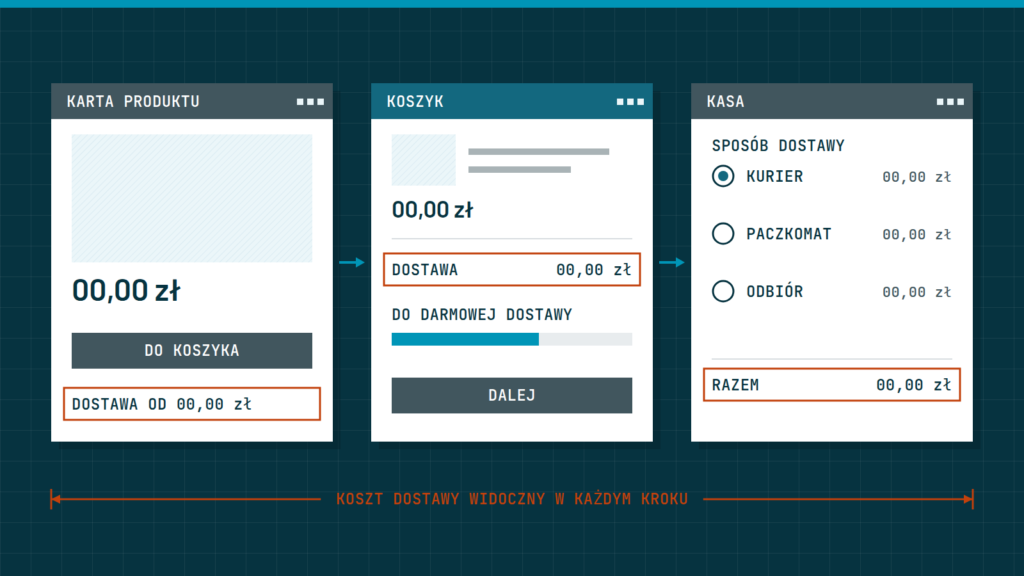
A delivery cost puts people off when the customer learns about it only in the cart. To avoid that, show it earlier, in plain words, together with the delivery date, and let the customer calculate it without creating an account. Below we describe why a surprise costs you sales and how to set up shipping information at every stage of shopping.
Why a delivery cost puts people off
The customer compares the price of the whole purchase, not just the product. If they see an amount on the product page and in the cart find that delivery is added to it, they feel cheated, even when the amount is fair. The price itself is not the problem; the surprise is.
The second reason is the lack of a comparison. The customer does not know whether the shipping cost is high, because they have no point of reference. If they see it earlier, they can decide knowingly: add something to the cart, choose pickup at a point, or buy elsewhere. Each of those decisions is better than walking away halfway through the order.
The third reason is hidden surcharges: for a parcel larger than usual, for delivery to the door, for cash on delivery. They are worth showing together with the main price, not adding in the last step. We write about how the whole purchase path affects the decision in the guide A checkout that does not put people off: how to design the purchase path.
Where to show delivery information
Delivery information should appear in several places, not just one. The earlier the customer sees it, the smaller the surprise.
| Place | What to show |
|---|---|
| A bar at the top of the page | the free delivery threshold, or the dispatch time if you ship quickly |
| Product page | the cost of the cheapest delivery or a field to check the cost, and the expected delivery date |
| Product list | a label on products with free delivery, if there is such an option |
| Cart | a full summary: value of products, delivery cost, total |
| The “Delivery and payment” page | all methods, prices, dates and rules in one place, without scrolling |
The customer does not always visit the terms page, so the key information must be where they make the decision. The page with details is a supplement, not the only source.
How to set delivery prices
How you calculate the cost depends on what you sell. Four approaches are the most common, and each has its drawbacks.
- A fixed price for the whole order. Easy to understand, but it can be unprofitable for heavy or large products.
- A price that depends on the order value. It lets you encourage a bigger cart, because the customer sees how much is missing for a lower fee.
- A price that depends on weight or size. Accurate, but harder to explain if the customer cannot see where the amount comes from.
- Free delivery above a threshold. The clearest and most widely used. It is worth setting the threshold slightly above a typical cart, so it encourages adding something but does not seem out of reach.
Before you set a threshold, work out what shipping, packaging and working time really cost you. Do not copy a threshold from another store, because its margins and parcel sizes are different. If you sell both small and large products, consider separate shipping classes, so prices match reality.
How to word the information
Good wording is short, specific and contains a number. Instead of “Delivery costs according to the price list”, write “Courier delivery €4, parcel locker €3, free delivery from €50” (the amounts here are only an example of the form of the sentence). Enter amounts that match your courier’s current price list, not ones from memory.
- Say how much is missing for free delivery: “You are €10 away from free delivery.” This bar in the cart is one of the most effective elements.
- Give the date: “Order before 2 pm and we will ship today.” The customer wants to know when the parcel will arrive, not only how much they will pay.
- Do not use words that sound like a hidden charge: “surcharge”, “handling fee”. If such a fee exists, name it plainly.
- Show personal collection and pickup points as full options, with a price.
Rules on informing about price and returns have legal requirements. Check the details with a lawyer.
The cart and the last step
In the cart the delivery cost must be visible before an account is created and before payment details are entered. It is best if the customer can enter a postcode or choose a delivery method and see the final amount at once. If the store demands an address before showing the cost, many customers will leave before that step.
Do not change the amount in the last step. If the customer chooses another payment method, the price should not change without a clear message. With every change, show the new total in the same place, in the same colour and size, so it can be compared with the previous one.
The most common mistakes in showing delivery
Even stores that try to be clear make a few repeated mistakes. It is worth knowing them, because many can be fixed in one evening.
- A “from” price that is never reached. If you write “delivery from” and give the lowest amount, while most customers pay more, they will feel misled. Show the amount a typical customer will pay.
- Separate prices in four places. When the product page, the cart and the information page give different amounts, the customer stops trusting any of them. Keep the delivery data in one place in the store settings and display it from there.
- An outdated threshold after a price list change. After the courier’s terms change, check the bar at the top of the page, the product description and the terms page.
- No information for orders abroad, to islands or hard-to-reach places. If you do not serve them, or serve them at a higher price, say so early.
- Free delivery for only one, the slowest method. That is fine, but say so clearly, because the customer may assume it covers all of them.
A good habit is to make a test purchase every quarter as a stranger and compare every amount with what actually follows from your courier contract.
A list of steps to take
- Go through the whole purchase on a phone and note at which step you first see the delivery cost.
- Add the cost or threshold on the product page and in the top bar.
- Work out the real shipping cost and set the free delivery threshold in a way that pays off.
- Add a bar in the cart showing how much is missing for free delivery.
- Write the “Delivery and payment” page in plain language, with prices and dates.
- After the changes, compare how many people abandon the cart, for example in the store’s weekly reports.
In short: show the delivery cost earlier than the cart, give specific amounts and dates, set the free delivery threshold according to your own costs, and do not change the total in the last step.
Want the purchase path in your store to be clear and honest? We will design it together with the whole store or book a call.