Initace
Real control over a website belongs to whoever the domain is registered to and whoever has administrator access to the hosting and the panel — not whoever designed it. The rights to the code and graphics themselves depend on what is written in the contract with the contractor. In practice this means you can pay for a website and still be unable to dispose of it freely — if the domain, the hosting or the passwords stayed with the contractor.
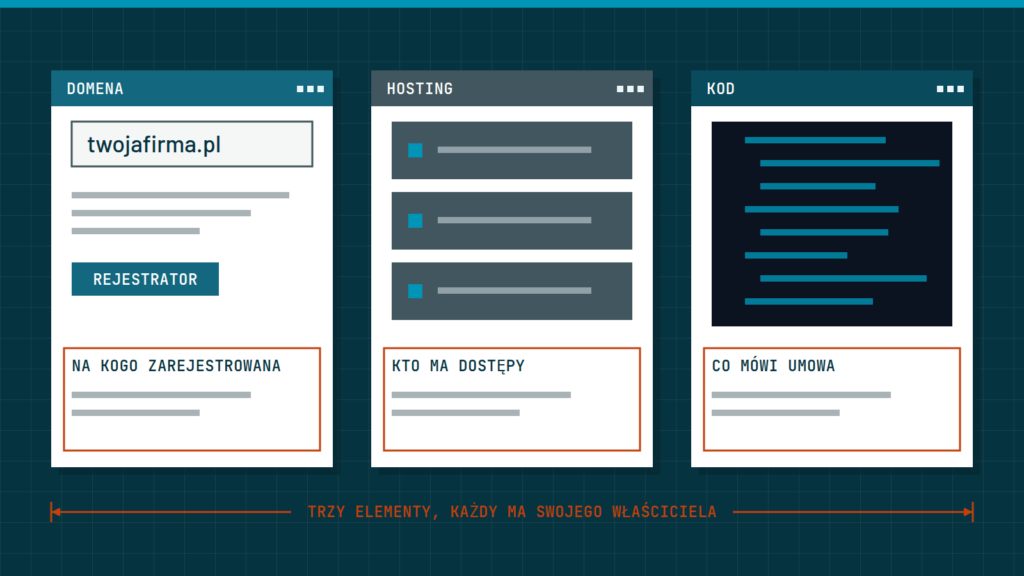
Three elements that together give you ownership of a website
- The domain. Your company’s internet address (for example yourcompany.com) should be registered to your company as the subscriber, in a registrar panel to which you have your own login and password — not on the contractor’s account. For .pl domains you can check this in the WHOIS search on the dns.pl site (the Polish domain registry): if the subscriber is a company, you will see its name; if the details are hidden, the subscriber is a private person.
- The hosting. The place where the website’s files and database physically sit. If the hosting account is set up in your company’s name and you have full access to it (or at least WordPress administrator access), you can move the site elsewhere at any time.
- The code and graphics. This element is governed by the terms of the contract. A good contract says plainly that the economic copyright in the design and code passes to you upon payment. Without such a clause the economic rights stay with the contractor, which can limit, for example, another company reworking the site. The software the site runs on (WordPress, PrestaShop, most plugins) is distributed under open licences — the contract concerns what the contractor created themselves.
What to check before signing the contract
- To whose details the domain will be registered — if to the contractor, ask for it to be transferred to your company right after launch.
- Whether you will get your own administrator account in the WordPress (or PrestaShop) panel at handover at the latest, and not only “on request”.
- Whether the contract expressly transfers to you the economic copyright in the design and code after payment. Transferring these rights requires written form, and the contract should list the fields of exploitation, meaning the ways the work may be used (for example copying, publishing online, modifying). It is worth having the details of the contract checked by a lawyer.
- Whether you will get a file with a full copy of the website and database, should you want to change hosting or contractor.
- Whether the site runs on a popular system (WordPress, PrestaShop), and not on a proprietary solution that only one company can maintain.
Check your current website in 10 minutes
- Enter your domain in the WHOIS search on dns.pl and check who the subscriber is and until when the domain is paid for.
- Log in to the domain registrar’s panel. If you do not have a login — that is the first warning sign.
- Log in to the website’s panel (in WordPress: Users) and check that you have your own account with the Administrator role, and not a shared contractor account.
- Check which e-mail address the accounts at the registrar, the hosting and the website panel are registered to. If it is the contractor’s address, password resets and payment reminders will go to them — change it to an address in your company.
- Write down all the access details in one place, ideally in a password manager, together with the renewal dates of the domain and hosting.
How to regain access to your own website
If the domain is registered to the contractor and contact with them has broken off, start by checking in WHOIS which registrar holds the domain, and write to them asking about the procedure for changing the subscriber. It usually requires the consent of the current subscriber; if there is none, the matter becomes a legal one and is worth consulting a lawyer about. With hosting it is similar: if you have no access at all, what remains is contacting the hosting provider and showing that the website is yours (for example with invoices for the service). That is why it is best to secure access in good time, rather than recover it after the fact.
How we do it at Initace
The website and the shop are yours from day one: the domain, the hosting and the licences are registered to your company. When Initace runs the hosting, you receive all the files and an up-to-date copy of the database when we stop working together, free of charge and without delay. You receive the administrator accounts and access details when the website is handed over. The site runs on a popular platform (WordPress or PrestaShop), so you are not dependent on a single contractor.
In short: control over a website = the domain in your company’s name + administrator access in your hands + copyright written into the contract. Check all three elements before you sign.
Have a current website and not sure who controls it? Write to us — we will help you check.